
TurboCAD 20

TurboCAD 20

Home Forums Soapbox TurboCAD 20

  • This topic is empty.
Viewing 20 posts - 1 through 20 (of 20 total)
  • Author
    Posts
  • #49270
    Bob Abell 2
    Participant
      @bobabell2

      Anybody out there, conversant with the above CAD system. please?

      Having used Autocad for the last 20 years, I`m a bit set in my ways

      Question…….Where is erase?

      Question…….Is there an OFFSET feature?

      That`ll do for starters, thank you

      Bob

      #8028
      Bob Abell 2
      Participant
        @bobabell2

        I have a few questions

        #49274
        Paul T
        Participant
          @pault84577

          Hello Bob

          I didn't know that you had bought a decent Cad system.

          In answer to your question I run TurboCad 19 Pro Platinum and so most of the features on your version should be similar to mine.

          For example the erase feature (from which I presume you mean cut / remove) is an icon showing a pair of scissors, simply highlight the item or items that you wish to erase and press the scissors.

          As for the offset feature I cant help as I have never used it.

          Paul

          #49276
          Bob Abell 2
          Participant
            @bobabell2

            That is a stroke of luck, Paul

            There are Tuition demos with the program, but I'm looking for answers to specific questions at the moment

            There must be an erase feature?….Surely?

            Next question….I need Ortho at all times….How do I achieve this?

            I can only assume, that the useful features I'm looking for are an Autocad copywrite?

            It would make a nice feature, for you to create a thread on TurboCAD training, Paul and bring enlightenment to the members?

            Note to Newbies….Drawing gadgets and mechanisms on Cad is a pure delight and is not difficult at all

            The program costs £80.00 at the moment….And that's cheap!….Autocad costs £900!

            Think about it, you chaps?

            Bob

            Bob

            #49277
            Dave Milbourn
            Participant
              @davemilbourn48782

              Bob

              Where can you buy a legal copy of AutoCAD for £900, please? Autodesk's current price is £4100. Even LT is over a grand.

              Dave M

              #49278
              Bob Abell 2
              Participant
                @bobabell2

                I just spotted the price as I was surfing about, but I didn't take much notice of it………No idea where it was

                Bob

                #49281
                Paul T
                Participant
                  @pault84577

                  Bob

                  I'm afraid that your faith in my ability to teach this subject is woefully misplaced however there are tutorials built into the software and many lessons have been posted on YouTube where people can work at their own pace.

                  Paul

                  #49310
                  Barry Gibson
                  Participant
                    @barrygibson15259

                    On my version of TurboCAD to delete something I select it and press delete on my keyboard. The offset is in the modify section. I click on 'sketch' on the top right hand side of the screen and then on modify. You can select ortho in snap modes , I don't use it so it may not be what you want. Sorry if I'm not too technical but I'm self taught and only know what I need to know.

                    #49312
                    Bob Abell 2
                    Participant
                      @bobabell2

                      Thank you, Barry for your reply

                      I'll have a look into that.

                      Why don't you use Ortho?….I would have thought that was essential on every drawing?

                      Bob

                      #49321
                      Barry Gibson
                      Participant
                        @barrygibson15259

                        I find I can do what I need to by using the length and angle boxes on the lower left of the screen. The perils of being self taught I suppose. I started with Delta CAD and graduated to TurboCAD. I've worked out how to do what I want to and never really bothered going any further.

                        #49334
                        Bob Abell 2
                        Participant
                          @bobabell2

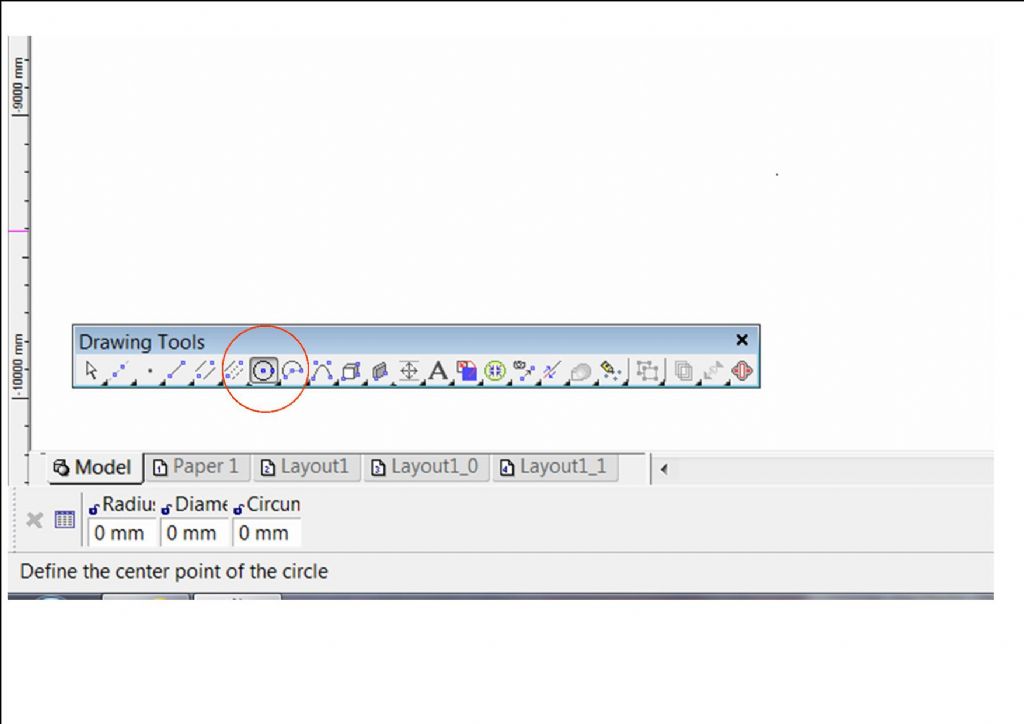
                          How do I insert a dimension in the box on the bottom LH side….For radius etc?

                          Bob

                          #49339
                          Paul T
                          Participant
                            @pault84577

                            Bob

                            Select the circle icon in the drawing tools and then the radius dialogue box will open in the lower left hand corner.

                            rad.jpg

                            Hope this helps

                            Paul

                            #49354
                            Bob Abell 2
                            Participant
                              @bobabell2

                              I`m now looking for a " MOVE " symbol, please

                              Bob

                              #49355
                              Paul T
                              Participant
                                @pault84577

                                Bob
                                That would depend upon what you want to move, a line, circle, part of a drawing, a full drawing or a drawing file.
                                Paul

                                #49356
                                Bob Abell 2
                                Participant
                                  @bobabell2

                                  I want to move small subassembly

                                  Bob

                                  #49357
                                  Paul T
                                  Participant
                                    @pault84577

                                    Bob
                                    When moving sections of a drawing I first copy the area that I wish to move by using the rubber stamp facility (right click and track down) and placing the copy away from the work area where I can check it before highlighting the entire part and dragging it to the new location.
                                    Only when I am happy with the move will I go back and delete the original location.
                                    However if you are satisfied that the subassembly is OK to move without checking then simply highlight the entire piece that you wish to move and drag it to the new location.
                                    Paul

                                    #49358
                                    Bob Abell 2
                                    Participant
                                      @bobabell2

                                      Thanks Paul

                                      The Brutus motor is RE700

                                      70mm O/L X 36.6 dia

                                      Shaft is 1/8" x 13 long

                                      C/L to base is 23mm

                                      So it will fit ok

                                      Bob

                                      #49365
                                      Paul T
                                      Participant
                                        @pault84577

                                        Bob
                                        I admire your optimism but if they fit without any mods…..I will eat my pie.
                                        Paul

                                        #49465
                                        Bob Abell 2
                                        Participant
                                          @bobabell2

                                          So it did fit, Paul…….Thanks to you selecting a special small size MFA700 motor!

                                          I would have preferred a chunky MFA 850BB and lower the bottom locally?…….Kinky, I know, but it gets that shaft down low!

                                          Making progress with the CAD now…..Drawn two views of a motor with dimensions and printed it off

                                          Bob

                                          #49472
                                          Paul T
                                          Participant
                                            @pault84577

                                            I enjoyed my cheese pie

                                          Viewing 20 posts - 1 through 20 (of 20 total)
                                          • Please log in to reply to this topic. Registering is free and easy using the links on the menu at the top of this page.

                                          Code of conduct | Forum Help/FAQs

                                          Latest Replies

                                          Home Forums Soapbox Topics

                                          Viewing 25 topics - 1 through 25 (of 25 total)
                                          Viewing 25 topics - 1 through 25 (of 25 total)

                                          View full reply list.